Fall 2022 - Spring 2023
Particle Ripple
Course: Creative Coding Lab
Midterm Project A: Generative Visuals
Date: Fall 2022
Location: Shanghai
Program: p5.js
My Project A, Particle Ripple, is a coded game with generative visuals implemented into it. My initial visual was to create a ripple effect through objects and lines, where each movement interacts between the objects. However, to make my project more interactive and purposeful, I decided to turn it into a game. The purpose of the game involves two players, where each player is to maneuver the ball to push their corresponding colored particles across the white “finish” line on the side where the initial ball is spawned. To win the game, one of the players must utilize a ball push either the blue or pink particles (depending on which team they are on) past the white line, where the score reaches at least 200. Once either of the scores reaches 200 points, an automated text will pop up indicating which player won (either Team Blue or Team Pink). The blue ball is controlled by the arrow keys on the keyboard, while the pink ball is controlled by using keys: A W S D; my inspiration for the movement controls were from computer games. One of the key rules of the game is that only corresponding colored objects can interact and affect each other; essentially the blue ball can only affect the blue particles, while the pink ball can only affect pink particles. My idea was to create a game that was simple to understand, interactive and fun, and had a hint of difficulty. The most difficult aspect of the game is pushing the particles far enough to go beyond the white line, as the repelling movement between the ball and the particles causes the particles to move in various directions. Another main aspect of the game is to illustrate the physics of the repelling movement between the particles and the ball as they are constantly pushed away, but never out of bounds. Overall, the fundamental purpose of the game was to create a sense of competition for the players in a visually appealing way with interesting, yet simplistic interactions.
Arcade - Cat Wars
Course: Creative Coding Lab
Final Project B: Website and Game
Date: Fall 2022
Location: Shanghai
Program: p5.js & HTML/CSS
Project B was the final project for CC Lab where students were to develop a website using html, css, as well as p5.js. For my project, my theme was to recreate an arcade theme with a user-interactive game. The game is called “Cat Wars” which the gameplay was actually inspired by my midterm project. The general theme of this website is an aesthetic, pastel-colored, retro-cyberpunk like arcade. My website consists of 4 HTML pages, 3 CSS, 2 P5.js, and one mp3 file. While this website was designed to focus on the game, it also has various links to my personal artwork portfolio, as well as other pages. The first HTML page is the home page of the website, in which utilizing CSS allowed me to properly layout the format. The second and third HTML pages are dedicated to the game itself; with one being the start mode, and the other being play mode. This website is significant to me as it displays what I have learned throughout the course of Creative Coding Lab, and how I applied that acquired knowledge into a website as well as a p5.js sketch. Taking into consideration of developing the website into something greater than just a game, I decided to dedicate the fourth HTML page to my personal artworks I have done outside of my education. The contrast of the portfolio page and the game pages adequately displays the differences between my personal life and the project I created. Cat Wars was made as a fun game designed for two users, as they compete to drag flowers over to their territory as well as eat the colorful fish to grow in size and gain more points. The scoring system is based on which actions are done by each cat, and the first one to reach 80 points wins!
Clown Fiesta
Course: Interaction Lab
Midterm: Interactive Project
Date: Spring 2023
Location: Shanghai
Program: Arduino
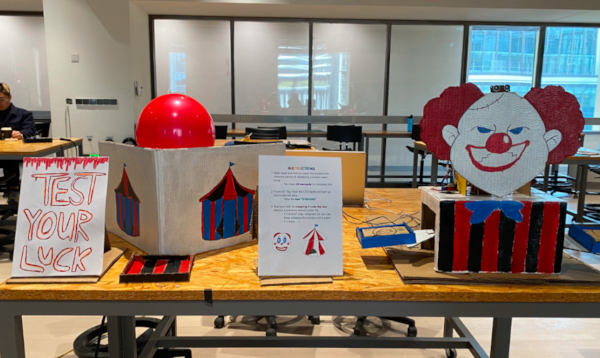
The initial goal of this midterm project was to create a game both visually appealing and interactive in a fun way. We wanted the circus to bring back childhood memories of going to the carnival, and wanted users to feel excitement, especially at the end where they tested their luck to see if the balloon would pop or not. I believe that the balloon popper tied the entire project together, as it left a lasting and strong impression on the audience, since it was both loud and anxiety inducing. Most users also mentioned that they really liked the large-scale project and how there were two parts to the project. Regarding my definition of interactivity, I mentioned that interaction shouldn’t have a solid goal that the users need to reach. However, my midterm project does go against my definition of interaction as it does hold somewhat of a goal. The goal of the clown mechanism is to activate all its mechanics by walking back and forth until you reach the random designated position, but there is not much of a goal for the balloon mechanism. The balloon station is merely a test of luck for users as they gamble whether or not the needle will reach the balloon. There is slight alignment of my project and my definition of interaction since I implemented random values to make things more interesting and unpredictable. The audience enjoyed our project as it left a strong impression and was quite visually appealing; however, the implementation of instructions was necessary since no one knew what to do without them. If I had more time, I would make sure the clown mechanism has an indicator to let the user know whether they need to move forward or backward to reach the random position. Whether it is by implementing a speaker, or having the buzzer or LEDs go off. I would also implement a timer to show the audience how much time they have left to try and activate the clown. For the balloon mechanism, I would incorporate a speaker so that the clown may essentially “laugh” or say something depending on if the balloon popped or not. The main setback for this project was the time crunch, and some issues with code. However, I took all the knowledge I acquired both from this course and my previous creative coding course to code adequately and demonstrate my vision through a physical project. Through this midterm, I learned that it is important for a project to be somewhat visually predictive so that the audience does not need to refer to instruction in order to interact with the object. Although there are flaws of this midterm project that I would’ve liked to fix and alter to make it better, I do believe that I expressed my vision to the best of my ability. Overall, this midterm project was quite stressful but I had fun and was extremely determined to have it function the way I envisioned it to, and it allowed me to bring my imagination to life.
Battle of the Card Bots
Course: Interaction Lab
Final: Interactive Project
Date: Spring 2023
Location: Shanghai
Program: Arduino & p5.js
The concept of “Battle of the Card Bots” is a two-player robot fight inside an arena, where each robot is user controlled through the joysticks. The primary objective of the game is to maneuver the bots and use the needle attached to its front to pop the opponent’s balloon (clipped on the back of each bot). The first bot to pop their opponent’s balloon wins the game! As they are called “card bots,” the theme is relative to the deck of cards, with colors of black and red being the overarching theme. The red robot is “club” while the black robot is “spade,” each have engravings of their card symbol on the back of their heads. To kickstart the entire game, the users refer to the Processing sketch where they navigate through a start page, instruction page, countdown screen, and playtime screen; depending on the result of the game once the 80 second playtime timer ends, there is a game over screen, and 3 corresponding screens (tie, spade wins, club wins). The countdown is 10 seconds, in which the users can test out the joystick controls of their respective robot, and each playtime round only lasts 80 seconds! The color of the LED strip inside of the arena will also fluctuate depending on which processing screen the users are looking at.